Polski

Zoho Webinar in practice

Webinars Still Work in 2026. The Problem Is Usually Not the Format, but the Data After the Event

Webinars might seem like a market that has already seen it all: everyone has hosted something, everyone has attended something, and audiences’ calendars are full. And yet, they remain one of the most effective ways to acquire customers. A webinar doesn’t just compete with other webinars. It competes with the habit of scrolling and the endless “I’ll come back to this later.” In this case, someone is actually choosing to spend time listening, learning, and asking questions. That creates a completely different level of engagement than clicking on an ad or briefly visiting a landing page.

In practice, many companies don’t struggle with organizing a webinar. They struggle with what happens next. Contacts end up in a webinar tool or in a downloadable file, someone exports them, someone imports them, someone adds them to a mailing list. Technically, everything can be managed. But along the way, context gets lost: where the participant came from, what interested them, whether they asked a question, whether they stayed until the end, whether they need a follow-up step. And when webinars are run regularly, that chaos only increases.

This article focuses on the technical side of webinars and why a cohesive ecosystem makes a difference. Using Zoho Webinar as an example, we’ll show an approach in which a webinar is designed from the start as part of a marketing and sales process—not as a one-off event with a list of attendees to process afterward.

Why “One Ecosystem” Wins

If you run a webinar in a separate tool while your marketing automation and CRM operate elsewhere, two things will eventually happen.

First, contacts will start to duplicate. Someone is already in your database, but the webinar tool creates a “new” record because there is no shared identifier or the fields don’t match. You then try to merge the records while campaigns are already running in different directions.

Second, the data will become fragmented. Even if the import works, you usually bring in a “raw list” rather than the full context. And it is context that fuels post-webinar communication. If you want to nurture leads effectively, you need to know not only that someone registered, but also where they came from, what topic interested them, at what point in time, and with what intent.

Within the Zoho ecosystem, this friction disappears because the webinar is not a standalone entity. It becomes part of the data flow. In practice, this means less manual work and fewer situations where “something didn’t work” and no one knows why.

Zoho Webinar – how to get started?

Zoho Webinar is available as a standalone tool or as part of bundles such as Zoho One or Zoho Marketing Plus. Importantly from a user perspective, you don’t need to look for a separate “webinar app,” as you often do with external tools. The webinar panel is built into Zoho Meeting—the same place where you also manage online meetings.

This has a practical advantage: most companies already use a meeting tool anyway. A webinar isn’t something “separate,” but a natural extension.

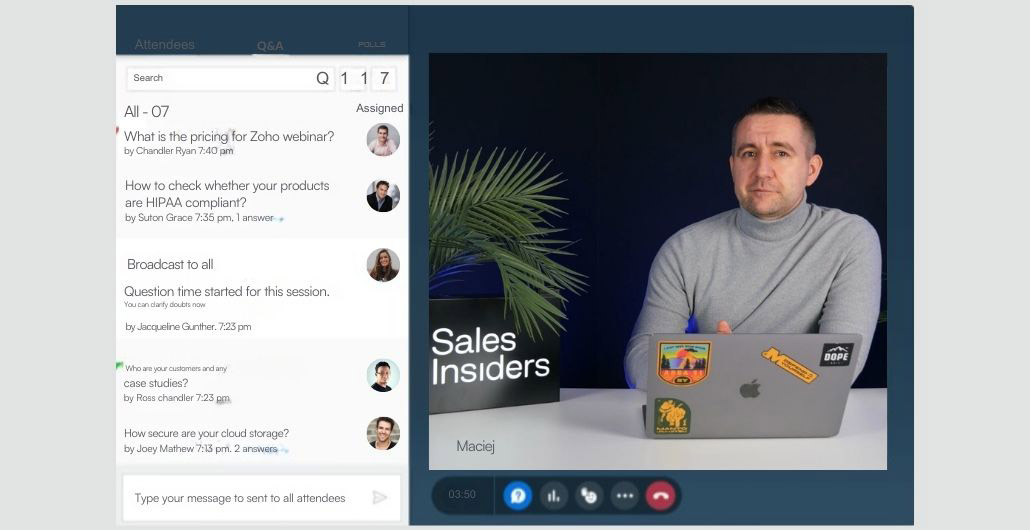
ZOHO Webinar Sales Insiders

Planning a webinar: the technical setup that saves hours of work later

You can run a webinar spontaneously, but in day-to-day business practice, it is most often planned in advance. And this is where technology meets marketing.

When you set up a webinar, you are not only defining the date and topic-you are also defining the conditions for data collection. In Zoho Webinar, the configuration guides you through key areas that matter later: event details, registration, participant communication, and interaction preferences.

Registration: it is not “just a form” it is the foundation of segmentation

Many companies keep registration to a minimum because “fewer fields = more sign-ups.” That can be true, but only until you realize that after the webinar you have no way to run meaningful follow-up communication. If you don’t know who the participant is and in what context they joined, your emails become generic—and generic emails usually lose.

In Zoho, you can design registration so it aligns with your branding while still giving you data you can actually use. It’s not about “more fields for the sake of it.” It’s about fields that genuinely support the next steps in the process: segment, role, area of interest, and the stage someone is at.

Interactions and Q&A: controlling questions is part of the attendee experience

A webinar is not just a broadcast. It is a moment when someone can engage.

You can allow questions during the session, but you can also decide whether those questions should be anonymous. You can choose whether questions are visible to all participants or only to the host. It may seem like a minor detail, but it has a significant impact on attendee behavior. In some industries, anonymity increases the number of questions. In others, transparency builds stronger dynamics and a greater sense of “event presence.”

And one more often underestimated aspect: automatic webinar recording. When you enable recording, you are already designing the second life of your content. A recording is not just “a file to send afterward.” It is content for further distribution, retargeting, onboarding, and sometimes even sales enablement materials.

Registration sources: a marketing gem

One of the best moments in the Zoho Webinar configuration process is tracking registration sources. You have a general registration link, but you can also create separate sources and generate a unique link for each one.

What does this mean in practice? If you promote the webinar on LinkedIn, you create a source called “LinkedIn” and use that specific link only in your LinkedIn posts. If you send out a newsletter, you create a source called “Newsletter” and include that link exclusively in the email. If you have support from a partner or ambassador, you create a source called “Ambassador” and provide them with their own dedicated link.

In your reports, you don’t just see “how many people visited,” but how many actually registered from each source. And that is exactly the difference that is often missing in marketing: you stop confusing reach with results. One source may generate a lot of traffic but few registrations, while another may bring fewer visits but a much higher conversion rate. With this information, you gain real insight into which channels are most effective and where it makes the most sense to invest.

What happens to contacts after the webinar?

This brings us to the core issue—the reason why it makes sense to think about webinars as part of an ecosystem rather than as a standalone tool.

Webinar contacts flow directly into Zoho Marketing Automation. There is no need to export them. No need to “upload a list” and wonder whether the fields match. You immediately see the source and can do what actually drives results in practice: launch logical post-event communication.

This is the moment when a webinar stops being a one-off activity and becomes part of a process. You can build scenarios such as: one path for those who stayed until the end, another for those who registered but did not attend, and yet another for those who asked a question. And this only works when the data is consistent and available “here and now,” not after a manual import the next day.

In practice, a cohesive ecosystem saves a significant amount of manual work, but more importantly, it prevents missed opportunities. The biggest issue with webinars is not having to click “export.” The real problem is that exporting and manual handling delay your follow-up communication—and in B2B, timing matters. A post-webinar lead stays “warm” for a limited window of time. If you reach out several days later because “the lists had to be sorted out,” you lose the momentum that the webinar content itself created.

Why a Unified Zoho Ecosystem Is a Major Advantage for Webinars

The greatest advantage of a “single ecosystem” is not that you have fewer logins. It is that the webinar stops being a standalone event and becomes part of a process.

When you run a webinar in Zoho, the data does not live “next to” your marketing and sales. You don’t need to export lists, match fields, fix duplicates, or wonder where the context was lost. Contacts, registration sources, and participant activity can immediately feed into the next steps: segmentation, nurturing, follow-ups, marketing automation campaigns, and sales outreach. As a result, post-webinar communication can start instantly—while the lead is still at its warmest—not “once someone manages to deliver the data.”

The second advantage is consistency of experience. If registration, messaging, and the entire logic happen within one environment, it is much harder to run into issues like: “the system sent an email with a different event name,” “the landing page looks different from the rest of the communication,” or “someone didn’t receive confirmation because the integration failed.” Fewer moving parts mean fewer points where something can break.

Ease of launching a webinar in Zoho Webinar

Zoho Webinar is easy to launch because you don’t start by building integrations—you start by setting up the event itself. You select a live webinar, define the topic and date, configure registration, and set up the messages. It is the type of tool where the “technical side” does not get in the way of marketing: the registration form, landing page, reminders, and basic interaction settings are all in one place and can be configured from a single interface.